






Implementing a public key encryption/asymmetric encryption is pretty straight forward with TweetNacl.
You generate an ECC key pair that has a public key and a private key. You get the public key of someone who you want to message/exchange data with. You encrypt your message using their public key and send it across and only the recipient with the corresponding private key can decrypt it. TweetNaCl also handles the digital signature/verification to ensure that it was really you who send the message and prevents alteration of the data. This is done by including your private key in the encryption process.
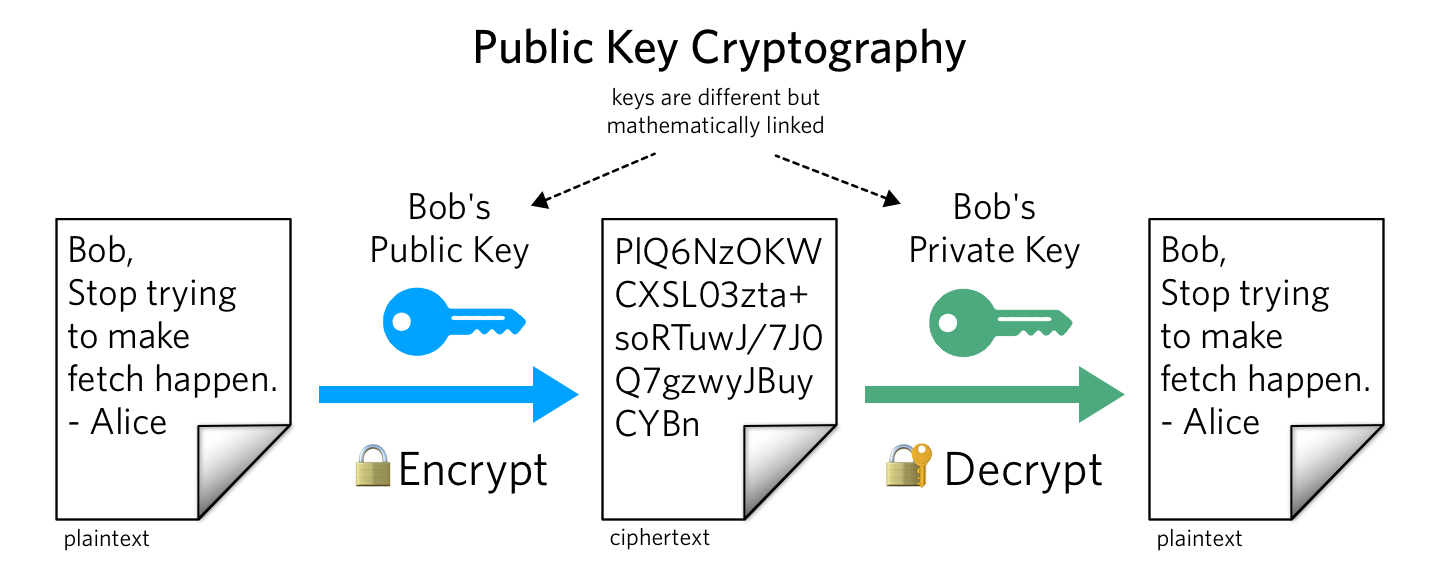
Source: Twilio
Here is how you can implement it with the TweetNacl library, a port of TweetNaCl/NaCl authored by the legendary Daniel J. Bernstein.
You can install as a node module by doing
npm i tweetnacl or yarn add tweetnacl
whichever package manager you prefer. You can also fetch it from a CDN, or use a local copy.
You also want to install tweetnacl-util. It has some nice encoding/decoding functions which we are going to need later.
To generate an ECC keypair,
const keys = nacl.box.keyPair();

// Object {
	  publicKey: [object Uint8Array],
  	  secretKey: [object Uint8Array]
}
You can further store the public and private keys in different variable or use it directly like keys.publicKey
I prefer to store in different variables for readability. Before encrypting a message, you need two more things: nonce and the recepient's public key.
Nonce is nothing but an added security measure, unique to this context that gets encrypted along with the key and data.
To generate a nonce,
const nonce = nacl.randomBytes(24);
Keep in mind that all these data generated are Uint8Arrays, so some type errors may occur if you are planning to send it across a network in JSON or other formats.
That is where the utility library tweetnacl-util comes in. Before proceeding to send messages across the network,
lets's frst encrypt the messages. Since the encrypt function is is expected the message/data in Uint8Array, you will need to encode the message/data.
const data = "i know when elden ring is releasing";
const encData = naclUtil.decodeUTF8(data);

// Uint8Array {...}
The above only works with strings. If you are using objects/arrays, make sure to convert it to a string and then to Uint8array. You can use JSON.stringify when you are encrypting and JSON.parse in decryption.
Now we have the nonce and the recepient's public key with us, we can go-ahead and encrypt the actual message.
const box = nacl.box(
encData,
nonce,
alicePublicKey,
bobPrivateKey);

// Uint8Array {...}
To decrypt this,
const data = nacl.box.open(box, nonce, bobPublicKey, alicePrivateKey)
// Uint8Array {...}

const decData = nacl.util.encodeUTF8(data);
// "i know when elden ring is releasing"
Now, there are a couple of things you should know about when sending the nonce, exchanging the public keys and data across a network.
Before sending and receiving, make sure to encode to Base64,
publicKey = naclUtil.encodeBase64(publicKey);

// FT5po+imGMSn13ClTwLc45GG1EUz90h7N8hPgf0UcXA=
Same for nonce, and the data.
On receiving these, you'll have to decode it back to Uint8Array before passing to
box.open (the decryption function), or it will throw type errors.
publicKey = naclUtil.encodeBase64(publicKey);

// Uint8Array {...}
For a working example, you can checkout keychat.online where I implemented TweetNaCl with Socket.io